Quick answer
If you are asking whether you can reuse an old passport-style photo in the United States, the safest answer is usually no.
The Department of State's passport photo page says to submit a recent color photo taken in the last 6 months. The visa photo page adds an important second rule: even if the image is not older than 6 months, a new photo can still be requested when it no longer reflects your current appearance.
That gives users a safer decision path: age matters first, but age is not the only test.
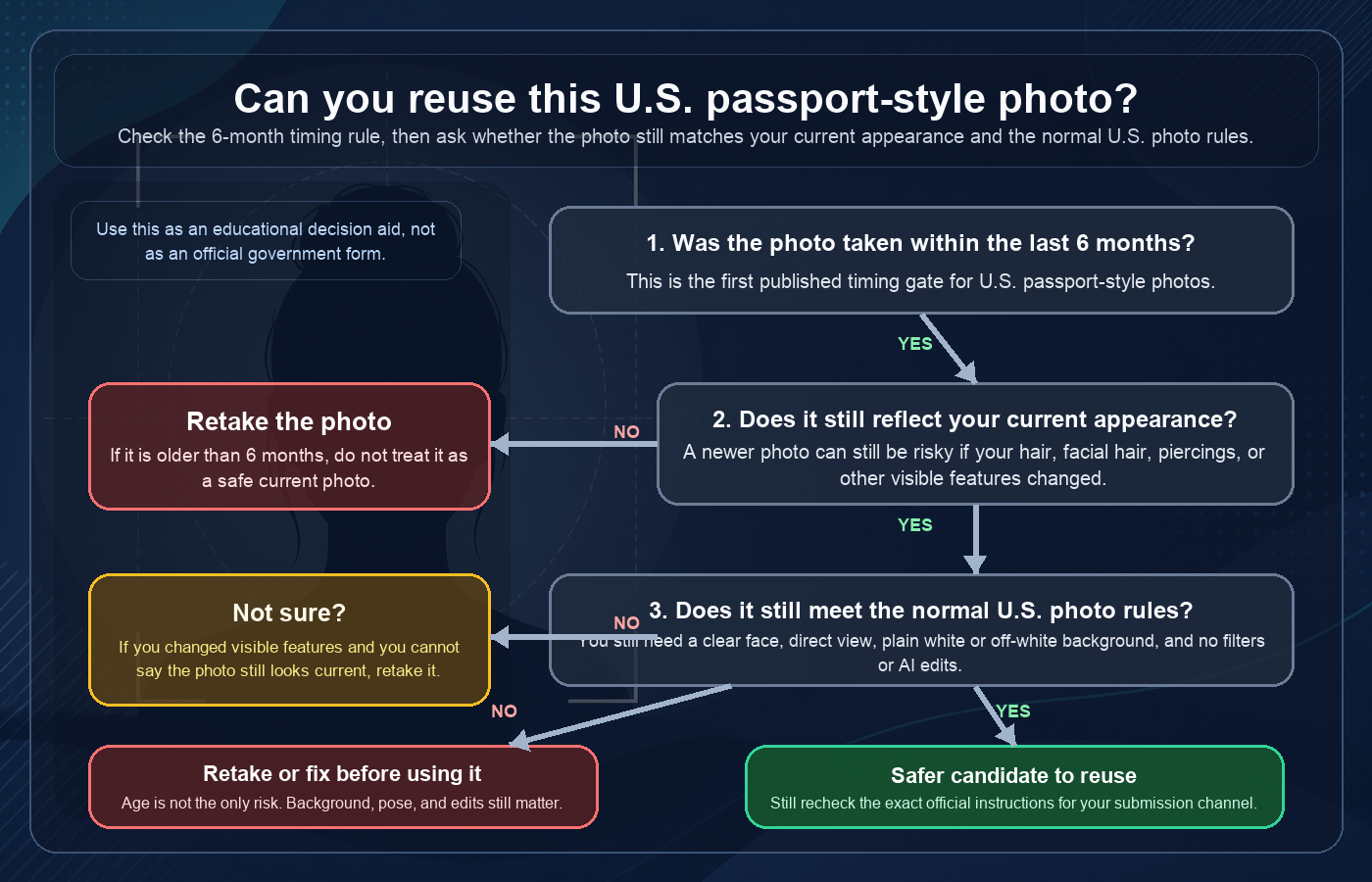
The first rule: was the photo taken within the last 6 months?
For passports, the public State Department photo page is straightforward: use a recent color photo taken in the last 6 months.
The online passport renewal photo page repeats the same timing boundary for digital uploads. So if your photo is older than 6 months, it is already outside the conservative passport-photo timing rule.
That means a common reuse idea is risky from the start:
- an old passport photo from a previous application;
- a school or studio portrait that happens to look formal;
- a profile photo saved on your phone;
- any older image that still "looks good" but is beyond the published timing rule.
The second rule: does the photo still reflect your current appearance?
The visa photo page gives the clearest published explanation here. It says the photo must be taken within the last 6 months to reflect your current appearance. It also says that if the photo does not reflect your current appearance, a new photo can be requested even if it is not older than 6 months.
That matters because people often focus only on the calendar. In practice, a newer photo can still become a bad choice when something visible changed.
Examples that can make a still-recent image less safe to reuse include:
- a major haircut or new hair color;
- adding or removing a beard or mustache;
- adding or removing numerous or large facial piercings;
- visible facial surgery, healing, or trauma;
- other changes that make the photo no longer look like your current face.
Passport first, visa as a supporting comparison
This guide is passport-first because that is the main search intent. But the visa page is still useful because it explains the current-appearance logic more explicitly than the general passport photo page does.
A careful public explanation is therefore:
- for a U.S. passport photo, follow the passport page's recent-photo rule;
- for a stricter practical decision, also ask whether the photo still reflects your current appearance;
- if the answer is no or not sure, retake it instead of trying to force reuse.
This keeps the advice conservative without pretending that every submission channel publishes the exact same wording.
A newer photo can still fail for normal photo-rule reasons
Even when a photo is recent and still looks like you, it still has to satisfy the normal U.S. photo rules.
The public passport photo page still requires:
- a clear image of your face;
- direct facing view to the camera;
- a plain white or off-white background;
- no software, phone-app, filter, or artificial-intelligence changes to your appearance.
So a photo can fail the reuse decision in more than one way. It may be too old, no longer current, or simply non-compliant on background, pose, lighting, or editing.
When reusing an old application photo is especially risky
Reusing a photo from a past passport, visa, school, or social profile image is often a bad shortcut because you usually do not control all three questions at once:
- Is it still within the published timing window?
- Does it still reflect your current appearance?
- Does it still meet the normal photo rules for today's submission channel?
If any answer is uncertain, the safer move is a new real photo.
What YapaPhoto can help with
YapaPhoto's U.S. passport photo path starts from a real uploaded photo. It can help prepare a digital crop/export and flag obvious risks such as a bad crop, poor background, off-angle face, or editing problems.
Keep the product boundary clear: YapaPhoto is a private preparation tool, not a government service, and it does not make the final acceptance decision. The current U.S. path is a digital crop/export workflow; checkout and print-board delivery are not enabled for this standard yet.
Start with the U.S. passport photo preparation path. For the baseline rules, read US passport photo requirements. If your process is visa-related, read US visa photo requirements. For digital-upload timing and file constraints, read online passport renewal photo requirements. If you are worried about editing boundaries, read US passport photo AI rules.
Step-by-step: decide whether to reuse or retake
- Check the date first. If the photo is older than 6 months, stop and retake it.
- If it is still recent, compare it honestly with your current appearance today.
- If your appearance changed in a visible way, retake it instead of arguing from the calendar alone.
- Recheck background, pose, face visibility, and editing boundaries.
- Treat crop or reposition tools as framing help only, not as a way to rescue an outdated or altered image.
- Review the exact official instructions for your document and submission channel before you submit.
Source-backed checklist before you reuse a photo
Before you reuse a U.S. passport-style photo, confirm that:
- the image was taken within the last 6 months;
- it still reflects your current appearance;
- the face is clear and directly facing the camera;
- the background is plain white or off-white;
- you did not use filters, retouching, apps, or AI to change your appearance;
- the final crop still matches the document's framing and upload expectations.
FAQ
Can I use a passport photo that is 7 months old?
The conservative answer is no. The State Department passport photo page requires a recent color photo taken in the last 6 months.
What if the photo is only 3 months old but I look different now?
Retake it. The visa photo guidance says a new photo can be requested when the image does not reflect your current appearance, even when it is not older than 6 months.
Can I reuse a photo from my previous passport or visa application?
Only if it is still within the timing window, still reflects your current appearance, and still satisfies the normal rules for the submission you are making now. In practice, many older application photos fail one of those checks.
Does a recent phone photo count if it still looks like me?
It can, but only if it is a real recent photo that still looks like you and still meets the normal background, pose, and no-editing rules. A phone origin does not create an exception.
Can YapaPhoto guarantee acceptance?
No. YapaPhoto can help prepare and precheck a real-photo crop/export, but the Department of State or the relevant submission process makes the final review decision.